

FlashVSR+: Efficient Video Super-Resolution via Hybrid Attention and Reward-Yield Distribution Matching
Paper • 2610.17552 • Published • 32
ONNX builds of FlashVSR+, made by Moonbox for on-device use with ONNX Runtime (CPU, CUDA, DirectML). Each
precision is one folder holding the graphs and a small Python pipeline.py that does the rest (image preprocessing,
the frame loop, mask handling); what the graphs take and return is under How to run.
The last column is the benchmark against the original PyTorch model (details under How to run): how closely each output frame matches the original's on the same clips and masks.
| Precision | File | Size | sha256 | Benchmark |
|---|---|---|---|---|
| fp16 | fp16/decoder.onnx |
38.2 kB | 5e84645e04a3 |
PSNR vs the original: mean 43.0 / 39.8 dB, worst frame 41.3 / 37.9 dB; 69 / 59 s per clip incl. session loads (CUDA; original 49 / 32 s) |
| fp16 | fp16/decoder.onnx.data |
90.7 MB | ffc1d5765404 |
PSNR vs the original: mean 43.0 / 39.8 dB, worst frame 41.3 / 37.9 dB; 69 / 59 s per clip incl. session loads (CUDA; original 49 / 32 s) |
| fp16 | fp16/dit.onnx |
2.5 MB | 64c1d9ac7f0e |
PSNR vs the original: mean 43.0 / 39.8 dB, worst frame 41.3 / 37.9 dB; 69 / 59 s per clip incl. session loads (CUDA; original 49 / 32 s) |
| fp16 | fp16/dit.onnx.data |
2.60 GB | 3827248669cb |
PSNR vs the original: mean 43.0 / 39.8 dB, worst frame 41.3 / 37.9 dB; 69 / 59 s per clip incl. session loads (CUDA; original 49 / 32 s) |
| fp16 | fp16/layers.json |
0.4 kB | 563ddd9b7533 |
PSNR vs the original: mean 43.0 / 39.8 dB, worst frame 41.3 / 37.9 dB; 69 / 59 s per clip incl. session loads (CUDA; original 49 / 32 s) |
| fp16 | fp16/lq_proj.onnx |
8.6 kB | 832c5371968e |
PSNR vs the original: mean 43.0 / 39.8 dB, worst frame 41.3 / 37.9 dB; 69 / 59 s per clip incl. session loads (CUDA; original 49 / 32 s) |
| fp16 | fp16/lq_proj.onnx.data |
575.7 MB | 675aa1987eb9 |
PSNR vs the original: mean 43.0 / 39.8 dB, worst frame 41.3 / 37.9 dB; 69 / 59 s per clip incl. session loads (CUDA; original 49 / 32 s) |
| fp16 | fp16/pipeline.py |
14.8 kB | 5f180cbf1b81 |
PSNR vs the original: mean 43.0 / 39.8 dB, worst frame 41.3 / 37.9 dB; 69 / 59 s per clip incl. session loads (CUDA; original 49 / 32 s) |
| int8 | int8/decoder.onnx |
38.2 kB | 5e84645e04a3 |
DiT MatMuls 8-bit: PSNR mean 42.9 / 39.6 dB, worst frame 41.1 / 37.7 dB; 70 / 59 s per clip (CUDA) |
| int8 | int8/decoder.onnx.data |
90.7 MB | ffc1d5765404 |
DiT MatMuls 8-bit: PSNR mean 42.9 / 39.6 dB, worst frame 41.1 / 37.7 dB; 70 / 59 s per clip (CUDA) |
| int8 | int8/dit.onnx |
2.6 MB | 8ab8c0ad310e |
DiT MatMuls 8-bit: PSNR mean 42.9 / 39.6 dB, worst frame 41.1 / 37.7 dB; 70 / 59 s per clip (CUDA) |
| int8 | int8/dit.onnx.data |
1.43 GB | ef33cb338a4b |
DiT MatMuls 8-bit: PSNR mean 42.9 / 39.6 dB, worst frame 41.1 / 37.7 dB; 70 / 59 s per clip (CUDA) |
| int8 | int8/layers.json |
0.4 kB | 563ddd9b7533 |
DiT MatMuls 8-bit: PSNR mean 42.9 / 39.6 dB, worst frame 41.1 / 37.7 dB; 70 / 59 s per clip (CUDA) |
| int8 | int8/lq_proj.onnx |
8.8 kB | 21c37fd04d1f |
DiT MatMuls 8-bit: PSNR mean 42.9 / 39.6 dB, worst frame 41.1 / 37.7 dB; 70 / 59 s per clip (CUDA) |
| int8 | int8/lq_proj.onnx.data |
571.3 MB | 3f9e7476ef31 |
DiT MatMuls 8-bit: PSNR mean 42.9 / 39.6 dB, worst frame 41.1 / 37.7 dB; 70 / 59 s per clip (CUDA) |
| int8 | int8/pipeline.py |
14.8 kB | 5f180cbf1b81 |
DiT MatMuls 8-bit: PSNR mean 42.9 / 39.6 dB, worst frame 41.1 / 37.7 dB; 70 / 59 s per clip (CUDA) |
FlashVSR+ (one-step streaming video super-resolution with hybrid attention; built on Wan2.1-T2V-1.3B), Turbo
preset, as three ONNX graphs plus pipeline.py, a numpy runtime that reproduces the repository's stream inference
(python -m inference.run_stream --mode turbo with its defaults). Apache-2.0.
How it runs. Each frame is centre-cropped to the output aspect and resized (bicubic) to the output size, as the CLI does. Then:
--cf is off by default, and so it is here.The graphs.
lq_proj.onnx: clip [1, 3, 4, H, W] in [-1, 1], its two streaming caches -> lq [1, H/16 * W/16, 1536] and the
new caches.dit.onnx: one stream chunk.x [1, 16, 4, H/8, W/8], lq, the RoPE angles (cos / sin). Then, per attention type (_b sparse,
_s sliding), the block bias of its window, topk1 and the empty-row fallback. Then the cached keys / values:
one [tokens, 1536] tensor per window, layer and k / v (c0k0 .. c2v29; empty slots where a layer keeps fewer).noise and the chunk's 2 windows of keys / values (n0k0 .. n1v29).layers.json lists the attention type of each layer.decoder.onnx: z [1, 784, H/8, W/8] (the pixel-shuffled frames plus one latent frame) and the 9 MemBlock states
-> 4 frames [4, 3, H, W] and the new states.The output size can be any multiple of 128.
import sys
from PIL import Image
from pathlib import Path
sys.path.insert(0, "fp16")
import pipeline
p = pipeline.FlashVSRPlus("fp16", "cuda")          # keep_loaded=True keeps the 3 sessions between calls
frames = [Image.open(f) for f in sorted(Path("clip").iterdir())]
out = p(frames, width=1280, height=768, seed=1)    # list of uint8 RGB frames at the output size
Or from the command line: python fp16/pipeline.py frames/ out/ --width 1280 --height 768 --cuda. It needs numpy,
Pillow and onnxruntime-gpu.
The attention. The repository runs this sparse attention with the Block-Sparse-Attention extension or its own Triton operator, neither available on Windows.
--hardware-profile generic it uses PyTorch SDPA, with the block mask expanded to tokens.Running it.
pipeline.py loads each graph for its phase and releases it after. keep_loaded=True
keeps them.--decode-every),
temporal compression other than 4, and colour correction aren't ported either.Precisions.
fp16/: all three graphs fp16, exported from the model cast to fp16 (the original runs in bf16).int8/: the DiT's MatMuls (96 % of its weights) and lq_proj's projection 8-bit MatMulNBits (block 32); the rest
fp16.Benchmark.
| clip 0 (768 x 768): mean / worst | clip 1 (896 x 512): mean / worst | seconds per clip | |
|---|---|---|---|
| original (PyTorch bf16, CUDA) | - | - | 49 / 32 |
fp16/ (CUDA) |
43.0 / 41.3 dB | 39.8 / 37.9 dB | 69 / 59 |
int8/ (CUDA) |
42.9 / 41.1 dB | 39.6 / 37.7 dB | 70 / 59 |
Before the benchmark, pipeline.py's loop was run with the graphs' modules in PyTorch (bf16) in place of the ONNX
sessions. It matched the original's frames to 42.2 / 41.0 dB on clip 1 (mean / worst).
From FlashVSR+ at revision b515ffc6db. The graphs were exported from the original PyTorch modules with
torch.onnx (opset 17 / 18) and checked against them. Weight-only quantization: int8 is a per-output-channel int8
weight behind DequantizeLinear, int4 is ONNX Runtime's MatMulNBits (block 32). Each card above says which precision
every graph uses. Every precision was benchmarked against the original before upload (the pass mark is under How to run), and the
sha256 column above is what the files must hash to.
Apache-2.0. These files are a derivative of the original model and carry its license: it is copied in this repository, and it governs your use of these files. The original model card follows unchanged.
Ruchang Yao1,2 Shi Guo1,† Junhao Zhuang3 Mingde Yao2,4 Xin Cai1,2
Jiahao Zhan2 Bin Fu1 Xinyuan Chen1 Yu Qiao1 Tianfan Xue1,2,4,†
1Shanghai AI Lab 2MMLAB CUHK 3Tsinghua University 4CPII under InnoHK
† Corresponding authors.


Your star means a lot for us to develop this project! :star:
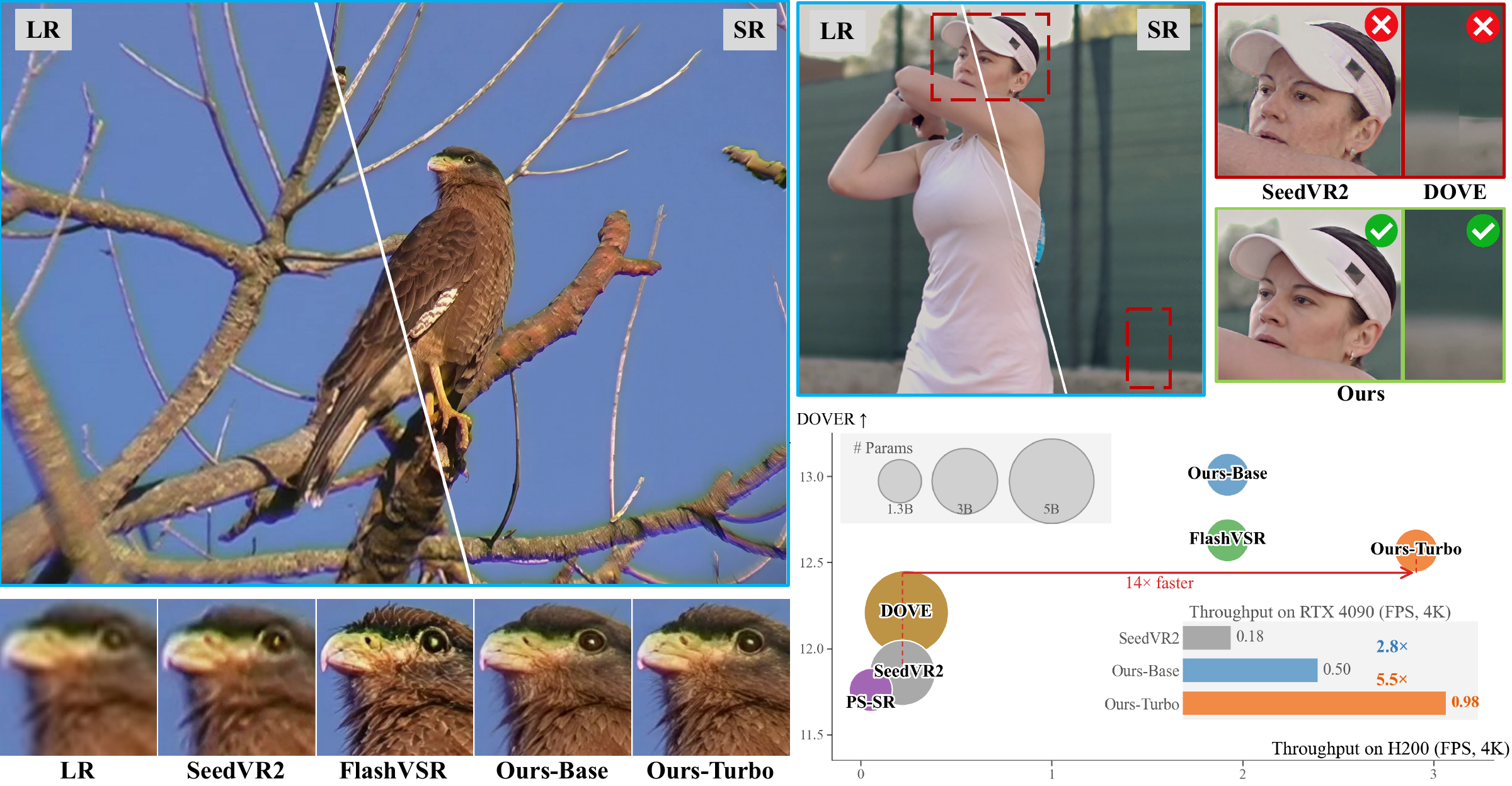
FlashVSR+ is an efficient one-step diffusion framework for high-quality video super-resolution, enabling spatially untiled 4K inference on a single 24GB RTX 4090 GPU.
FlashVSR+ introduces two key innovations:
We release the inference code, pretrained models, and training dataset to facilitate further research and applications.
--temporal-compression from 4 (default) to 2 or 1 to better preserve motion details in videos with large motion.--decode-every reads and writes video in segments; the default auto mode loads the full input.We appreciate the community's efforts to extend and optimize FlashVSR+:
Disclaimer: These community contributions have not been officially tested or verified by our team. We sincerely thank all contributors for their valuable work!
venvThe released inference pipeline is CUDA-only and does not support CPU inference.
conda create -n flashvsr_plus python=3.10 -y
conda activate flashvsr_plus

pip install -r requirements.txt
pip install -e . --no-deps
The editable installation exposes the flashvsr_plus Python package and keeps
the python -m inference.run_stream command available.
--no-deps is intentional. It prevents the package installation from modifying an existing PyTorch/CUDA environment.
venv
The project also works in a standard Python 3.10 virtual environment. It uses the host NVIDIA driver/CUDA runtime.
python3.10 -m venv .venv
source .venv/bin/activate

python -m pip install --upgrade pip setuptools wheel
python -m pip install -r requirements.txt
python -m pip install -e . --no-deps
After either setup, activate the environment before installing an optional attention backend or running inference.
FlashVSR+ supports two optimized sparse-attention backends:
PyTorch SDPA is also available as a fallback.
The automatic backend priority is:
BSA → FlashVSR Triton → PyTorch SDPA
Only one optimized backend needs to be installed.
Clone the official Block-Sparse-Attention repository:
cd operators
git clone https://github.com/mit-han-lab/Block-Sparse-Attention.git
Then follow the installation instructions in the official BSA repository to build and install the CUDA extension.
BSA requires a working CUDA compilation toolchain, including nvcc.
After installation, FlashVSR+ will automatically use BSA when it is available and compatible with the current GPU.
Our Triton backend depends on FlashAttention utilities. Install FlashAttention first:
pip install flash-attn==2.7.4.post1 --no-build-isolation
Then install the FlashVSR Triton operator:
pip install -e operators/flashvsr_attn --no-build-isolation --no-deps
Unlike BSA, the Triton backend does not compile a custom CUDA extension with nvcc.
If neither optimized backend is available, FlashVSR+ falls back to PyTorch SDPA.
To explicitly force SDPA:
python -m inference.run_stream ... --hardware-profile generic
You can also explicitly select an attention backend using --attn-kernel. If the requested backend is unavailable, inference will fail early instead of silently switching implementations.
Download the Turbo and Base model weights from ruchangyao/FlashVSR_plus on Hugging Face.
For the v1 preset, download the weights separately from
JunhaoZhuang/FlashVSR-v1.1 on Hugging Face.
Place dit.safetensors and lq_proj_in.safetensors in ckpts/v1/.
After downloading, arrange the files under the repository root as shown below.
Keep the Turbo, Base, and V1 checkpoints in their respective directories; all
presets share TCDecoder.ckpt.
ckpts/
├── turbo/
│   ├── dit.safetensors
│   └── lq_proj_in.safetensors
├── base/
│   ├── dit.safetensors
│   └── lq_proj_in.safetensors
├── v1/
│   ├── dit.safetensors
│   └── lq_proj_in.safetensors
├── TCDecoder.ckpt
└── Wan2.1_VAE.pth          # only required when using the VAE decoder

prompt_tensor/
└── posi_prompt.pth
The default streaming pipeline uses TCDecoder.ckpt.
prompt_tensor/posi_prompt.pth is included in this code repository. Keep it at
the path shown above when using the default presets.
Wan2.1_VAE.pth is only required when using the VAE decoder through the unified Python API or inference.cli.
Run from the repository root after installing dependencies and placing the
checkpoints under ckpts/.
python -m inference.run_stream \
    --input examples/case_0.mp4 \
    --mode turbo \
    --output outputs/case_0_turbo.mp4 \
    --height 2048 \
    --width 3840
python -m inference.run_stream \
    --input examples/case_1.mp4 \
    --mode base \
    --output outputs/case_1_base.mp4 \
    --height 1024 \
    --width 1920
V1 uses the same inference configuration as Base and loads weights from
ckpts/v1/.
python -m inference.run_stream \
    --input examples/case_1.mp4 \
    --mode v1 \
    --output outputs/case_1_v1.mp4 \
    --height 1024 \
    --width 1920
python -m inference.run_stream \
    --input examples/case_2.mp4 \
    --mode turbo \
    --output outputs/case_2_turbo.mp4 \
    --height 2176 \
    --width 3840 \
    --decode-every 28
--decode-every takes a positive multiple of 4. Smaller values reduce the number of frames held for each decoding segment. Without this option, the default auto mode loads the full input video before inference.
Both height and width must be divisible by 128.
The CLI center-crops and resizes the input, then writes an H.264 MP4. It keeps the input FPS and audio stream when present. Incomplete temporal groups are padded internally and cropped back to the original frame count.
--temporal-compression controls the effective number of input frames per VAE latent frame: 4 (default), 2, or 1. For videos with large motion, use 2 or 1 to better preserve motion details, at the cost of increased inference time. We recommend 4 for most videos, and 2 or 1 for large-motion videos.
| Option | Default | Description |
|---|---|---|
--mode {turbo,base,v1} |
turbo |
Select the model preset. |
--input PATH |
required | Input video path. |
--output PATH |
required | Output MP4 path. |
--height N |
required | Output height. Must be divisible by 128. |
--width N |
required | Output width. Must be divisible by 128. |
--max-frames N |
all | Maximum number of decoded input frames. |
--cache-offload-mode {auto,never,always} |
auto |
KV-cache residency policy. |
--decode-every N |
auto |
Read and decode in segments. N must be a positive multiple of 4; auto loads the full input. |
--temporal-compression {1,2,4} |
4 |
Input frames per latent frame. Use 2 or 1 for large motion, with higher inference cost. |
--cf |
off | Enable low-frequency color correction. |
For all available options, run python -m inference.run_stream --help.
| Option | Default | Description |
|---|---|---|
--seed N |
1 |
Latent initialization seed. |
--device DEVICE |
cuda:0 |
CUDA device used for inference. |
--ckpt-dir PATH |
preset path | Override the checkpoint directory for the selected model. |
--hardware-profile {auto,generic} |
auto |
auto enables optimized kernels; generic forces PyTorch SDPA. |
--attn-kernel NAME |
auto |
Stream attention backend: auto, sdpa, block_sparse, or triton_block_sparse. FlashAttention 2/3 cannot represent the required causal/sparse block masks. |
--tiny-decoder-mode {auto,serial,parallel} |
auto |
TinyDecoder execution strategy. Serial mode uses less workspace memory. |
--serial-tiny-decoder |
off | Shorthand for serial TinyDecoder execution. |
--tiny-decoder-channels-last/--no-tiny-decoder-channels-last |
on | Use channels-last BF16 convolution storage. |
--color-correction/--no-color-correction |
off | Enable or disable low-frequency color correction; --cf enables it. |
--color-correction-levels N |
5 |
Wavelet color-correction levels. |
--color-correction-chunk-size N |
16 |
Frames processed per color-correction chunk. |
--offload-original-cache |
off | Offload selected original-attention KV caches to host memory. |
--temporal-merge {gaussian,first} |
gaussian |
Strategy for merging repeated frames at temporal compression 1 or 2. |
--temporal-gaussian-sigma N |
1.0 |
Gaussian sigma used for temporal merging. |
--video-preset NAME |
veryfast |
x264 encoding preset, from ultrafast to slow. |
Force BSA:
python -m inference.run_stream ... \
    --attn-kernel block_sparse
Force the FlashVSR Triton backend:
python -m inference.run_stream ... \
    --attn-kernel triton_block_sparse
Force the portable PyTorch SDPA implementation:
python -m inference.run_stream ... \
    --hardware-profile generic
Run this example from the repository root with the model files in place.
from pathlib import Path

from inference import InferenceRequest, build_inference_pipeline
from inference.presets import model_paths_for_mode, stream_config_for_mode

config = stream_config_for_mode("turbo", device="cuda:0")
paths = model_paths_for_mode(Path.cwd(), "turbo")
pipeline = build_inference_pipeline(config, paths)

result = pipeline.infer(
    InferenceRequest(
        input_path="input.mp4",
        output_path="outputs/restored.mp4",
        height=384,
        width=768,
    )
)
The same public API is also exposed through the stable package namespace:
from flashvsr_plus import InferenceRequest, build_inference_pipeline
Tensor inputs must have one of the following shapes:
[1, 3, F, H, W]
[1, F, 3, H, W]
Input values should use the model's [-1, 1] range.
The context tensor can either be supplied for each request or loaded from the model bundle.
inference/       CLI, inference pipeline, preprocessing, and decoding
models/          DiT, attention, conditioning, and VAE implementations
model_io/        checkpoint loading and key normalization
operators/       optional attention operators
prompt_tensor/   released context tensor
ckpts/           local model weights
@misc{yao2026flashvsrefficientvideosuperresolution,
      title={FlashVSR+: Efficient Video Super-Resolution via Hybrid Attention and Reward-Yield Distribution Matching},
      author={Ruchang Yao and Shi Guo and Junhao Zhuang and Mingde Yao and Xin Cai and Jiahao Zhan and Bin Fu and Xinyuan Chen and Yu Qiao and Tianfan Xue},
      year={2026},
      eprint={2610.17552},
      archivePrefix={arXiv},
      primaryClass={cs.CV},
      url={https://arxiv.org/abs/2610.17552},
}

@article{zhuang2025flashvsr,
  title={FlashVSR: Towards Real-Time Diffusion-Based Streaming Video Super-Resolution},
  author={Zhuang, Junhao and Guo, Shi and Cai, Xin and Li, Xiaohui and Liu, Yihao and Yuan, Chun and Xue, Tianfan},
  journal={arXiv preprint arXiv:2510.12747},
  year={2025}
}