

Kintsugi for Inkling 2 Mini
Thinking Machines' Inkling 2 Mini in our own 2-3 bit file, made to run on one 12 GB NVIDIA card with a 262,144-token context.
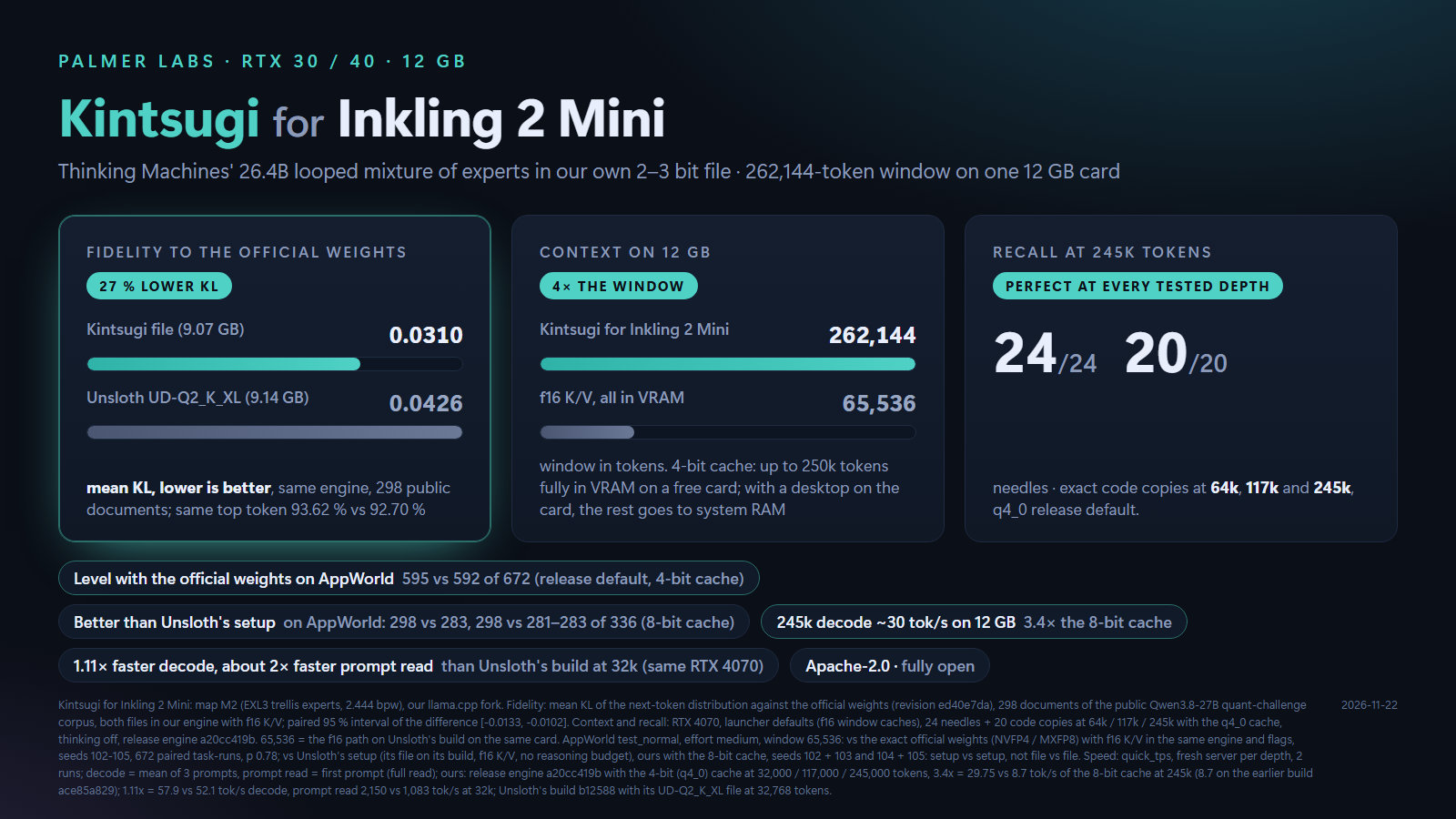
How it was made: the method, the evidence and the tests behind these numbers are in the paper "Kintsugi: Find and Repair Quantization Damage Where Tasks Break, Not Where Averages Look": https://github.com/professorpalmer/kintsugi-method (DOI 10.5281/zenodo.24455575)
What this is
- The model: Inkling 2 Mini by Thinking Machines (26.4B looped mixture of experts, Apache-2.0), text only.
- This file: every expert in EXL3 trellis code at 2 or 3 bits (2.444 bits per weight over the experts), fitted by us on Thinking Machines' weights. Mean KL 0.0310 against the official weights on a public golden set; the same top token 93.62 %.
- The engine: our llama.cpp fork (MIT). Only this engine loads the file. It keeps the K/V cache of the model's 8
global attention passes at 4 bits (q4_0): up to 250k tokens in VRAM on a free card, the rest in system RAM: 262,144
tokens on 12 GB. It also has a repetition guard for agent loops (on by default: at two stuck points it broke the
loop in 6 and 7 of 10 tries, against 0 of 10 without it) and an opt-in two-slot mode (
INKLING_SLOTS=2: one shared window, fewer cells in VRAM, saved chats off, not bit-equal to one slot). - The bundles (Windows and Linux, with the engine, launcher and saved-chat layer) are on GitHub.
Results (RTX 4070 12 GB, the bundle's defaults)
| Fidelity to the official weights (mean KL, same top token) | 0.0310, 93.62 % |
| The same test, Unsloth's UD-Q2_K_XL (9.14 GB) in the same engine, 2026-11-21 | 0.0426, 92.70 % (ours: 27.3 % lower KL, 27.7 % with the release-default K/V; on user / tool text past 1k tokens ours is higher, 0.76 vs 0.61) |
| AppWorld agent tasks vs the official weights (NVFP4 / MXFP8, exact, same engine), 672 paired task-runs | 595 vs 592 with the release default (4-bit cache): level (p = 0.78) |
| AppWorld vs Unsloth's setup (its file on its build; setup vs setup, not file vs file; ours with the 8-bit cache) | 298 vs 283 and 298 vs 281-283 of 336: better |
| Recall at 64k / 117k / 245k (24 needles / 20 code copies) | 24/24 + 20/20 at each depth (q4_0 release default) |
| Decode at 4k / 32k / 117k / 245k (tok/s) | 64.5 / 57.9 / 42.4 / 29.75 |
| Coding harnesses (6 tasks each): Claude Code, Codex, Pi, OpenCode | 5 of 6 in each |
Details, settings and dates: benchmarks.
Use it
- Download the bundle for your system from the GitHub releases and unpack it.
- Download
Kintsugi-Inkling-2-Mini-12G.gguffrom this page into the bundle'smodelsfolder. SHA-2567d93d5e8e61f6694776ec8b488751787a7dd3cb745d4f9eaee9f0b78b0e60cec. - Start:
powershell -ExecutionPolicy Bypass -File start-server.ps1 -Wait(Windows) or./start-server.sh --wait(Linux). The server is OpenAI-compatible onhttp://127.0.0.1:8080/v1and works with Claude Code, Codex, Pi and OpenCode.
Needs: an NVIDIA RTX 30 / 40 / 50 card with 12 GB or more, or an H100 / H200 (RTX 50 and Hopper from bundle v1.0.1; see "Hardware"); driver 580+ (Windows) or 570+ (Linux); 32 GB of system RAM is best for very long chats.
Hardware
| Hardware | Status |
|---|---|
| RTX 40 (Ada) | Supported: every release check ran on an RTX 4070 (Windows and Linux). The v1.0.1 Windows engine gives the same output as v1.0 on it (KL check and 50 / 50 identity prompts token-identical). |
| RTX 30 (Ampere) | Supported: the v1.0 release engine (the same source as v1.0.1) was checked on an RTX 3080 Ti (Linux): it starts with the launcher defaults, 24 / 24 needles at 32k, the identity prompts answer, top-1 agreement 97.8 %. Its mean KL is 7.5 % lower than on the RTX 4070; without one near-tie token in the 4070 reference run the two cards differ by 0.6 % (the same kernels; only the order of sums differs). |
| RTX 50 (Blackwell, desktop) | Supported from v1.0.1. The Linux engine was checked on an RTX 5060 Ti 16 GB: it starts with the launcher defaults (all 262,144 cells in VRAM), mean KL 0.0397 and top-1 92.60 % on our 10-document check (RTX 4070: 0.0400 and 92.51 %), 24 / 24 needles at 32k, the 50 identity prompts answer, the same 50 answers with PDL on and off, 0 CUDA errors. The Windows engine has the same code for these cards, but we did not run it on an RTX 50 card. RTX 50 laptop GPUs and RTX PRO Blackwell cards: not checked. |
| H100 / H200 (Hopper) | Supported from v1.0.1. The Linux engine was checked on an H100 PCIe 80 GB: it starts with the launcher defaults (all 262,144 cells in VRAM), mean KL 0.0401 and top-1 92.57 % on the same check, 24 / 24 needles at 32k, the 50 identity prompts answer, the same 50 answers with PDL on and off, 0 CUDA errors. H200 has the same code (compute capability 9.0) but was not checked. The Windows engine has the code too, but we did not run it on a Hopper card. |
| Other Blackwell (B200 / GB200, GB10 / DGX Spark) | Not supported: this engine has no native code for them, and it does not run the portable code yet. The launcher stops with a message. |
| A100, V100 and older cards | Not supported: this engine has no code for them. The launcher stops with a message. |
| RTX 20 (Turing) | Not supported: it fails our exact-output checks and runs 6-14x slower than an RTX 4070. |
| AMD Radeon | Not yet: after Kintsugi-27B's AMD release (test builds exist). |
| Apple Silicon | Not yet: needs its own port; not scheduled. |
| Intel GPUs | Not supported: this engine has no code for them. |
You need 12 GB of VRAM or more, and an NVIDIA driver 580 or newer (Windows) or 570 or newer (Linux). 32 GB of system RAM or more is best for very long chats.
Files
| File | Size | SHA-256 |
|---|---|---|
Kintsugi-Inkling-2-Mini-12G.gguf |
9,067,638,560 | 7d93d5e8e61f6694776ec8b488751787a7dd3cb745d4f9eaee9f0b78b0e60cec |
LICENSE |
Apache-2.0 |
How it was made
Hessians from our forward pass of the official weights on the public calibration corpus of the Qwen3.8-27B quant
challenge (StillDeadcode, CC BY 4.0), re-rendered with Inkling's template; every expert saw every token during the
capture, and the three loop passes add into one Hessian. Fits with exllamav3's quantize_exl3 (turboderp, MIT);
the Escha W2 layout (Escha Labs).
- Map M2 (2.444 bits per weight over 24,461,180,928 expert weights): the down projections at 3 bits in all 24 layers; the fused gate and up projections at 3 bits in the 4 global layers (5, 11, 17, 23) and at 2 bits in the other 20.
- Other tensors: attention projections and head Q8_0, token embedding Q4_0, loop controllers, sinks and
convolution projections F16, router and norms F32, all from Thinking Machines' official release (revision
ed40e7da). - The GGUF metadata, tokenizer and chat template are as in Unsloth's GGUF of the model (Apache-2.0).
Licence and use
This file is a quantized derivative of Inkling 2 Mini by Thinking Machines, licensed under Apache-2.0 (see LICENSE). Use of the model is also subject to the Thinking Machines Model Acceptable Use Policy. Our engine is MIT; our launcher and layer are Apache-2.0.
Credits
Thinking Machines (Inkling 2 Mini); turboderp (exllamav3: the EXL3 codec, quantize_exl3 and the CUDA kernels);
Albert Tseng, Qingyao Sun, David Hou and Christopher De Sa (QTIP); Escha Labs (the Escha W2 format); StillDeadcode (the
calibration corpus and golden set, CC BY 4.0); Unsloth (the llama.cpp port of Inkling 2 Mini that our engine code is
ported from, MIT); Piotr Wilkin, Daniel Han, Aldehir Rojas and Xuan-Son Nguyen (the upstream llama.cpp support); Project Maya
(MIT: Peasant Smith and the Project Maya contributors, Niko1221 and the Strata contributors; mrsirg97-rgb and
OscarSheng for the Inkling 2 engine maya-ik2; Alexey Fateev (alesha-pro) for the Inkling 2 Mini work: the measurement
of llama.cpp's per-token launch overhead on Inkling 2 Mini and the idea to fuse its small glue launches, which our own
fused kernels follow; cobra91 for the Windows port); the ggml authors and llama.cpp contributors. Full list:
CREDITS.md. No person or company
named here endorses or sponsors this project.
- Downloads last month
- 6
We're not able to determine the quantization variants.
Model tree for CaryPalmer/Kintsugi-Inkling-2-Mini
Base model
thinkingmachines/Inkling-2-Mini